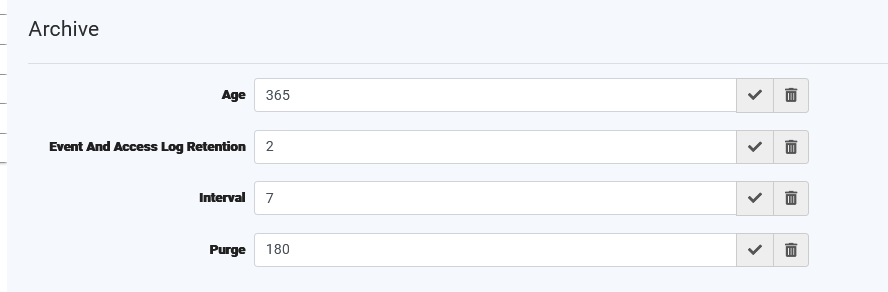
The Auto Archiver helps manage system storage and performance by:
- Periodically archiving older data
- Deleting outdated records based on defined retention policies
All configuration values are integer-based and represent retention periods.
Note: For instructions on how to add or modify system configuration values, refer to the Add New System Configuration article.
Auto Archiver Configuration
Archiver Schedule
Important: All retention settings require archive.interval to be configured.
| Setting | Description | Unit | Example |
|---|---|---|---|
archive.interval | Controls how often the archiver process runs. If the value is set or changed, the system will evaluate how many days it has been since the last run. If the days since the last run is equal to or greater than your interval, the process will run overnight. | Days | 7 → Runs every 7 daysoff→ Will not run |
Retention & Archiving Settings
| Setting | Description | Unit | Behavior | Example |
|---|---|---|---|---|
archive.purge | Deletes old database audit records across all data types | Days | Deletes audit logs older than the specified number of days | 90 → Keeps 90 days of audit logs |
archive.age | Archives uploaded documents | Days | Moves documents older than the specified number of days to archive storage | 30 → Archives after 30 days |
archive.eventAndAccessLogRetention*implemented in version 5.47 | Deletes database user activity logs and event run history. Minimum value is 2 years. | Years | Removes logs older than the specified number of years | 2 → Keeps 2 years of logs |
Quick Summary
archive.interval= required trigger- Other settings = optional retention rules
- All values must be positive integers
Example Configuration
| Setting | Value |
|---|---|
| archive.interval | 7 |
| archive.purge | 180 |
| archive.age | 365 |
| archive.eventAndAccessLogRetention | 2 |
Result:
- Archiver runs weekly
- Audit logs kept for 180 days
- Documents archived after 365 days
- Activity logs retained for 2 years